
SubTime - Sub Timer & Rotation
OTDSoft Inc.Sports
4.797.00 Reviews
- Version
- 10.8.11
- Installs
- 100.00K
- Age Rating
- Everyone
Screenshots
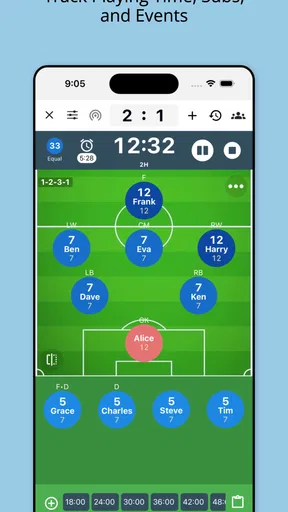
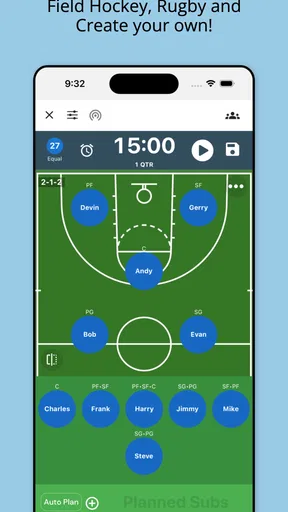
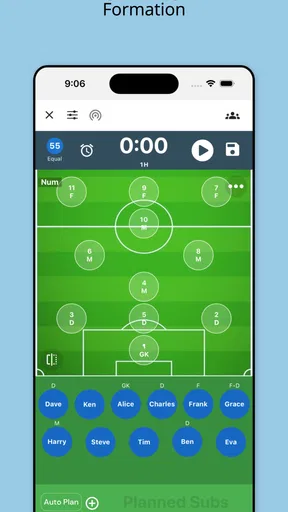
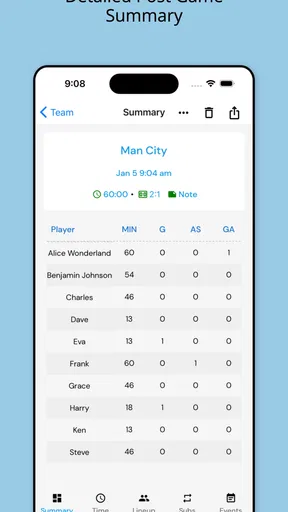
Our Review of SubTime - Sub Timer & Rotation
 Analysis by Appyee
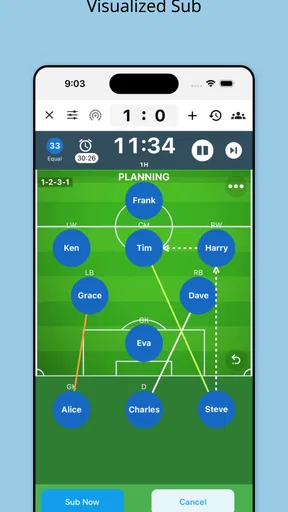
Coaching a youth sports team often means doing several jobs at once: watching the play, remembering who has been on the field, preparing the next change, and keeping the bench organized. I found SubTime useful because it focuses on that narrow but important problem instead of trying to become a complete team-management platform. It is a free sports app from OTDSoft Inc. built around playing-time tracking, substitutions, and lineup planning.
That focus is its biggest strength. I would not choose it to replace a full club administration system, a detailed statistics package, or a shared team calendar. I would choose it when the immediate need is to make substitutions more deliberate and easier to follow during a match. The app has a 4.7 average from over 700 ratings, and that feels consistent with its practical purpose: it solves a recurring sideline headache without requiring a complicated coaching workflow.
How the basic sideline workflow feels
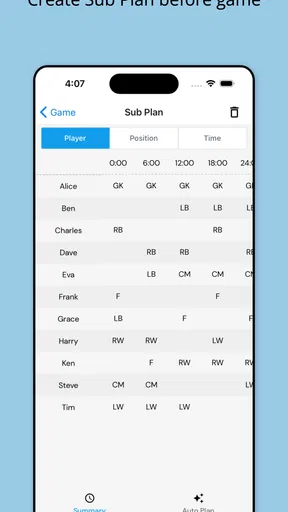
The most useful way to approach SubTime is to prepare before the match rather than trying to build everything while play is already moving. I would begin by setting up the players who are available, then think through the starting group and the order in which substitutes should enter. That small preparation step matters because a rotation tool only helps when the information inside it reflects the real squad for that day.
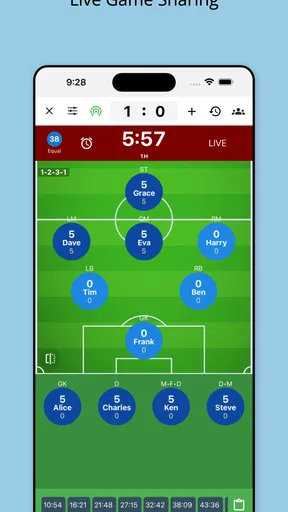
During the game, the central habit is recording changes as they happen. Instead of trusting memory, I can use the app as a running record of who is playing and who is waiting. That gives me a clearer view when the match becomes hectic. A coach who is also answering questions from parents, watching the score, or dealing with an injured player can easily lose track of a previous change. A visible rotation plan reduces that mental load.
I especially like the distinction between planning a lineup and managing the live rotation. Those are related tasks, but they are not identical. A lineup answers who should begin or occupy a position. A rotation process answers when players should come off and who should replace them. Treating them separately makes the tool more useful than a simple handwritten list, because I can make a plan before kickoff and still adjust it when the game develops differently.
A realistic example would be a weekend youth match where one player arrives late and another needs a shorter shift. With paper notes, I might cross out names, rewrite an order, and then forget which version is current. In SubTime, I can use the planned structure as a starting point and adapt the next change. The important benefit is not that the app makes the coaching decision for me; it keeps the decision visible after I make it.
This is also where I would set expectations. The app cannot judge effort, fitness, tactical understanding, or whether a child is ready for a particular role. It is a tracking and planning aid, not a coaching assistant with its own sporting judgment. I still need to watch the game and decide whether the planned substitution makes sense.
Preparing a rotation that survives real play
My advice is to create a simple first plan rather than attempting to predict every minute of the match. A plan with too many exact assumptions can become a burden when the referee stops play, the team changes shape, or the opponent forces a different response. I would prepare the opening group, identify the first likely rotation, and keep a sensible order for the following changes.
That approach produces a useful balance between fairness and flexibility. Players can receive regular opportunities without making the coach feel trapped by the original schedule. It also helps avoid a common sideline mistake: making the next substitution based only on who was most recently noticed, rather than on who has actually had enough time on the field.
For younger teams, the visual record can be valuable after the match as well. I can look back at the sequence and notice whether the same players repeatedly received longer stretches or whether a planned rotation was regularly interrupted. That is more constructive than relying on impressions, especially after a close game when emotions distort memory.
Settings and preparation choices worth checking
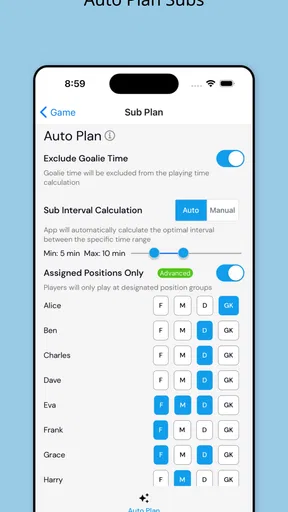
The most important “settings” are not necessarily technical switches. They are the choices that determine how I use the app before the first whistle. I would check the player list carefully, remove anyone unavailable for that particular match, and make sure names are easy to identify quickly. A cluttered list is a small problem during preparation but a major distraction when I need to act in seconds.
I would also decide whether the goal is equal playing time, a particular tactical rotation, or simply a reliable record of changes. Those goals can overlap, but they are not the same. If equal participation is the priority, I need to use the playing-time record actively rather than assuming that a prearranged order will remain fair. If the priority is tactical balance, the app should support my plan without becoming a rigid promise that prevents sensible adjustments.
Another useful preparation habit is to separate the “available today” group from the broader team in my own process. A youth roster may contain players who are absent, resting, or attending another event. Including everyone in the working list makes the rotation harder to read. Before relying on the app at the sideline, I would take a moment to make the match-specific setup as clean as possible.
Because the app is rated for Everyone, it is approachable for the adults who typically manage youth teams, and its minimum operating requirement is Android 7.0 or later. That makes it suitable for many older Android phones, although I would still test the current device before match day. A coach should not discover at kickoff that a familiar screen is difficult to read outdoors or that the phone battery is too low for the planned session.
SubTime is free to install, but it includes in-app purchases ranging from $2.49 to $34.99 per item. I would treat that as a reason to explore the basic workflow first, then decide whether any paid option genuinely improves my routine. A coach who only needs a straightforward rotation record may not need to spend anything. Someone managing several groups or wanting a broader workflow may find a purchase more relevant, but I would judge that against the actual needs of the team rather than paying automatically.
The current version is 10.8.11, so I would make sure the app is updated before an important tournament and then avoid changing the workflow at the last minute. The practical lesson is simple: preparation is part of using a coaching tool. I would test creating a player group, setting a lineup, and recording a change in a calm environment. That rehearsal makes the live experience faster and prevents the phone from becoming another source of stress.
Small habits that make the record more reliable
I would keep the phone in one consistent place and use the same moment in every stoppage to check the next change. For example, after recording a substitution, I can immediately identify the next player likely to enter. This creates a repeatable rhythm instead of forcing me to reconstruct the whole situation every time play stops.
I would also avoid treating the planned order as a substitute for communication. Players still need to know where to go, and an assistant or parent helping on the bench may need a quick explanation. The app can keep the plan organized, but a short verbal cue remains faster than handing the phone around while the match is active.
A less obvious benefit is that consistent records can improve conversations after games. If a parent asks about a child’s involvement, I can respond from a recorded sequence rather than from a vague recollection. That does not remove every disagreement, and it does not turn playing time into a perfect measurement of a player’s experience, but it gives the discussion a more dependable starting point.
Faster patterns for experienced users
After using the basic workflow, I would move toward a repeatable pattern: prepare once, confirm the active group, follow the planned order, and adjust only when the match requires it. The speed comes less from tapping quickly and more from reducing decisions at the wrong time. If I already know the next two possible changes, I can focus on the game instead of searching through the roster.
One effective pattern is to build rotations around natural stoppages. Depending on the sport and competition rules, stoppages may provide a calmer moment to make a change. I can use those moments to check the current playing group, confirm who is ready, and record the transition immediately. This is safer than waiting until the bench becomes crowded with questions or trying to remember a change several minutes later.
A second pattern is to use the app as a fairness check rather than a stopwatch that dictates every decision. I can glance at the record before choosing the next substitution and ask whether the current plan is still balanced. This matters when a player has been left on longer because of a close phase of play, or when an unexpected interruption has changed the original sequence.
A third pattern is to prepare a fallback order. If a player becomes unavailable, I should already know which role or position can be covered next. SubTime can help me keep the revised lineup and rotation visible, but the coaching decision still comes from my knowledge of the team. This is where the app works best: it holds the structure while I supply the sporting judgment.
I would be cautious about overloading the setup with elaborate plans. A detailed sequence may look impressive before the game but become difficult to maintain when the score, opponent, or player condition changes. The best workflow I found is the one I can understand at a glance. If I need to stop and interpret my own plan, it is too complicated for live use.
Compared with a notebook, SubTime offers a cleaner way to keep the current rotation visible and revise it without creating a pile of crossed-out notes. Compared with a general team-management app, it is more focused on the actual substitution moment. A spreadsheet can be more flexible for long-term analysis, but it is less convenient when I am standing beside a field and need a quick record. A dedicated statistics app may provide deeper performance information, yet that extra detail can distract from the simple question of who should enter next.
That comparison also explains who should skip it. If I need attendance, messaging, payments, schedules, medical records, and season-long player reports in one place, I would look for a broader team platform. If I coach a sport with highly specialized substitution rules or require official competition reporting, I would verify that the app’s simple planning approach fits those rules before depending on it. Its value is strongest when the core problem is practical rotation control.
Where the focused design reaches its limits
The same simplicity that makes SubTime approachable can feel limiting for a coach who wants a complete tactical workspace. Planning a lineup and tracking playing time are useful, but they do not replace a diagram board, opponent analysis, training plans, or detailed player evaluation. I would not expect the app to explain why a formation worked or recommend a change based on match events.
There is also a human limitation: accurate records depend on consistent input. If I forget to record a substitution, the later playing-time picture becomes less trustworthy. A busy coach may find that the app creates a new responsibility rather than removing one. The solution is not to abandon it, but to establish a simple rule for when every change gets recorded and make that rule part of the bench routine.
Another trade-off is flexibility versus fairness. A strict rotation can support equal opportunities, but real matches sometimes demand an adjustment. A player may need a break, a position may require stability, or the team may be defending a narrow lead. SubTime can show me what I planned and what has happened; it cannot decide which value should win in that moment. Experienced use means accepting that the record may show an uneven match for a good reason.
I would also avoid assuming that a digital record automatically improves communication with families. The app helps me remember what happened, but I still need to explain the team’s playing-time approach clearly and apply it consistently over time. A single match record can be useful evidence, yet it should not become the only measure of whether a youth program is well managed.
Privacy and device discipline matter in ordinary ways too. I would use only the player information needed for the rotation task, protect the phone from being passed casually around the bench, and keep a backup understanding of the plan in case the device becomes unavailable. The app is a tool in the workflow, not the workflow itself. A coach who has no alternative when the battery dies has placed too much dependence on any single app.
For a volunteer coach, the learning curve should be manageable because the purpose is narrow. Still, I would not introduce it for the first time during a high-pressure final. A short practice session before a regular game is enough to discover whether the roster layout, lineup process, and live recording style suit me. That trial is especially important if assistants will also help with substitutions.
My verdict after building a repeatable coaching habit
I see SubTime as a practical specialist rather than an all-purpose sports app. It earns its place when I want a clearer way to plan lineups, follow substitutions, and keep playing time from becoming a matter of guesswork. The free entry point makes it easy to test, while the focused design means I can understand its purpose quickly. OTDSoft Inc. has kept the concept centered on a real sideline need instead of surrounding it with unrelated features.
The app is particularly well suited to youth coaches who rotate players regularly and want a dependable record without carrying a notebook full of revisions. It is also useful for an assistant coach who needs to support the head coach by watching the bench and keeping the next change organized. Families may benefit indirectly because a consistent record can encourage fairer, clearer conversations about participation.
I would recommend it less strongly to professional or highly specialized teams that need official match administration, deep analytics, or extensive collaboration. Those users may outgrow the focused workflow. I would also hesitate if I knew I would not have time to maintain the record during play. In that case, a simpler paper method or a dedicated assistant may be more realistic than installing an app and leaving it unused.
For everyone else, my best advice is to use it with restraint. Build a clean match roster, prepare a flexible order, record each change at the same kind of stoppage, and review the sequence afterward. Do not try to make the app responsible for tactical decisions or perfect fairness in a single game. Its real strength is giving me a stable reference so that my coaching decisions are less dependent on memory.
My final recommendation is straightforward: choose SubTime if your biggest sideline problem is remembering and organizing rotations, not if you are looking for a complete team-management system. Used as part of a repeatable habit, it can make youth-match substitutions calmer, more transparent, and easier to adjust. That focused usefulness is enough to make it a worthwhile sports app for the right coach.
As a free app with an Everyone age rating, broad Android compatibility from version 7.0 onward, and a strong 4.7 average across over 700 ratings, it has a solid case for trial. I would start with the basic workflow, decide whether the screen fits my match routine, and only then consider any optional in-app purchase. For a coach who wants a digital alternative to improvised notes, SubTime is a sensible, focused companion on the bench.
Verdict
Strengths of SubTime - Sub Timer & Rotation
- Quickly creates and manages rotating subscription payment schedules.
- Useful reminders help prevent missed payments or renewal dates.
- Clean interface makes recurring costs easy to review at a glance.
- Supports planning for subscriptions shared across different billing cycles.
- Helpful for tracking services that rotate between multiple users.
Limitations of SubTime - Sub Timer & Rotation
- May require manual updates when subscription prices or participants change.
- Limited value for users who only manage a few fixed monthly subscriptions.
- Reminder accuracy depends on correctly configured dates and rotation settings.
- Some advanced tracking options may be unavailable without in-app upgrades.
- Not a replacement for detailed budgeting or full expense-management tools.
Similar Picks in This Category
View All
BeSoccer: Soccer Live Score
BeSoccer apps4.3

Cricbuzz - Live Cricket Scores
Cricbuzz.com3.7

NFL
NFL Enterprises LLC2.4

Da Fit
MO YOUNG LIMITED3.6

ESPN
Disney4.5

LiveScore: Live Sports Scores
LiveScore Limited4.5
Frequently Asked Questions
What is SubTime - Sub Timer & Rotation used for?
SubTime - Sub Timer & Rotation is designed to help coaches, players, and teams manage substitutions during matches. It can be used to create timers, track rotation intervals, and receive reminders when it is time to change players. Before downloading, keep in mind that its usefulness depends on the sport and the way your team handles substitutions.
Which sports and game formats are compatible with SubTime?
The app is primarily useful for sports that rely on timed rotations or frequent substitutions, such as basketball, futsal, volleyball, hockey, and similar team games. It may also work for training sessions and recreational matches. However, users should check whether the available timer and rotation settings match their specific rules, number of players, periods, and substitution strategy.
Can I customize timers, periods, and player rotations?
SubTime is intended to provide flexible timing and rotation management rather than a single fixed countdown. Depending on the version and device, you may be able to adjust match duration, intervals, substitution frequency, and player information. It is worth reviewing the available settings after installation, especially if your team uses unusual periods or customized rotation plans.
Does SubTime require an internet connection to work during a match?
A timer and rotation tool is generally most useful when it remains available courtside, even in places with weak connectivity. SubTime may be able to run core timing features offline, but certain functions could depend on the device, operating system, or optional online services. Test the app before an important game and keep your phone charged to avoid interruptions.
Is SubTime - Sub Timer & Rotation free, and are there any limitations?
The download and basic features may be available without payment, but availability of advanced tools, advertisements, or optional purchases can vary between Android and iOS versions. Before relying on it for regular competitions, check the current store listing for pricing, supported devices, privacy information, and in-app purchase details. Also confirm that the free version includes the timers and rotation controls your team needs.
